

Battery Mode 4.3.3 build 206
Battery Mode 4.3.3 build 206 | Size: 5.67 MB
Language: English
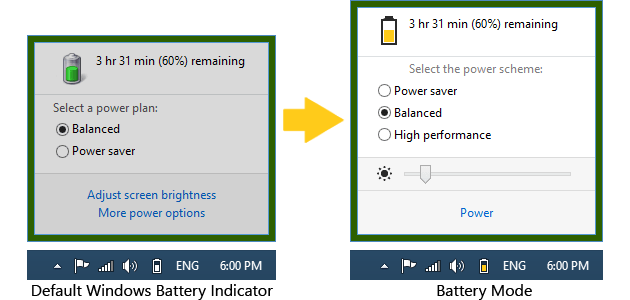
Battery Mode is an advanced power management and battery charge indicator. Power Management Modes allow you to choose what you no longer need at the moment: the duration of the performance, or battery life.
Convenient switching power
• Activate the "Energy Saving" - and your laptop can run for up to two times longer!
• There is a lack of productivity? Retarding system? Not enough FPS in games? Turn on "high performance" to turn off all power-saving features and improve performance.
• Activate the "Balanced" - and the system itself will control the power.
Pleasant lighting control
• There is no need to clamp the cunning combination of keys to adjust the backlight. Just open the Battery Mode and adjust the backlight slider.
• Tired of hopping backlight when you connect the charger or the change of diet? Enable the "Fixed screen brightness" in the "Advanced Settings" - lights will no longer change itself!
Keyboard shortcuts for power users
• Power Management Modes can be switched by means of "hot keys» Alt + Pause.
• Use a utility program NextScheme, to switch modes in your scripts or programs.
• Enter NextScheme * .exe -? to get help.
System requirements
Windows XP / Windows Vista / Windows 7 / Windows 8 / Windows 8.1 / Windows 10
Supported languages
English, French, Brazilian Portuguese, Hungarian, Russian, Ukrainian
FREE DOWNLOAD LINKS:
https://rapidgator.net/file/5b589f3a2343c1ef7fee3d5ea2a9447c/Battery_Mode_4.3.3_build_206.rar
https://nitroflare.com/view/7FCC71E68C6B736/Battery_Mode_4.3.3_build_206.rar

Information
Users of Guests are not allowed to comment this publication.

